
1. Introduction to Google Ads Ecosystem
Understanding the Fundamentals of Google Ads
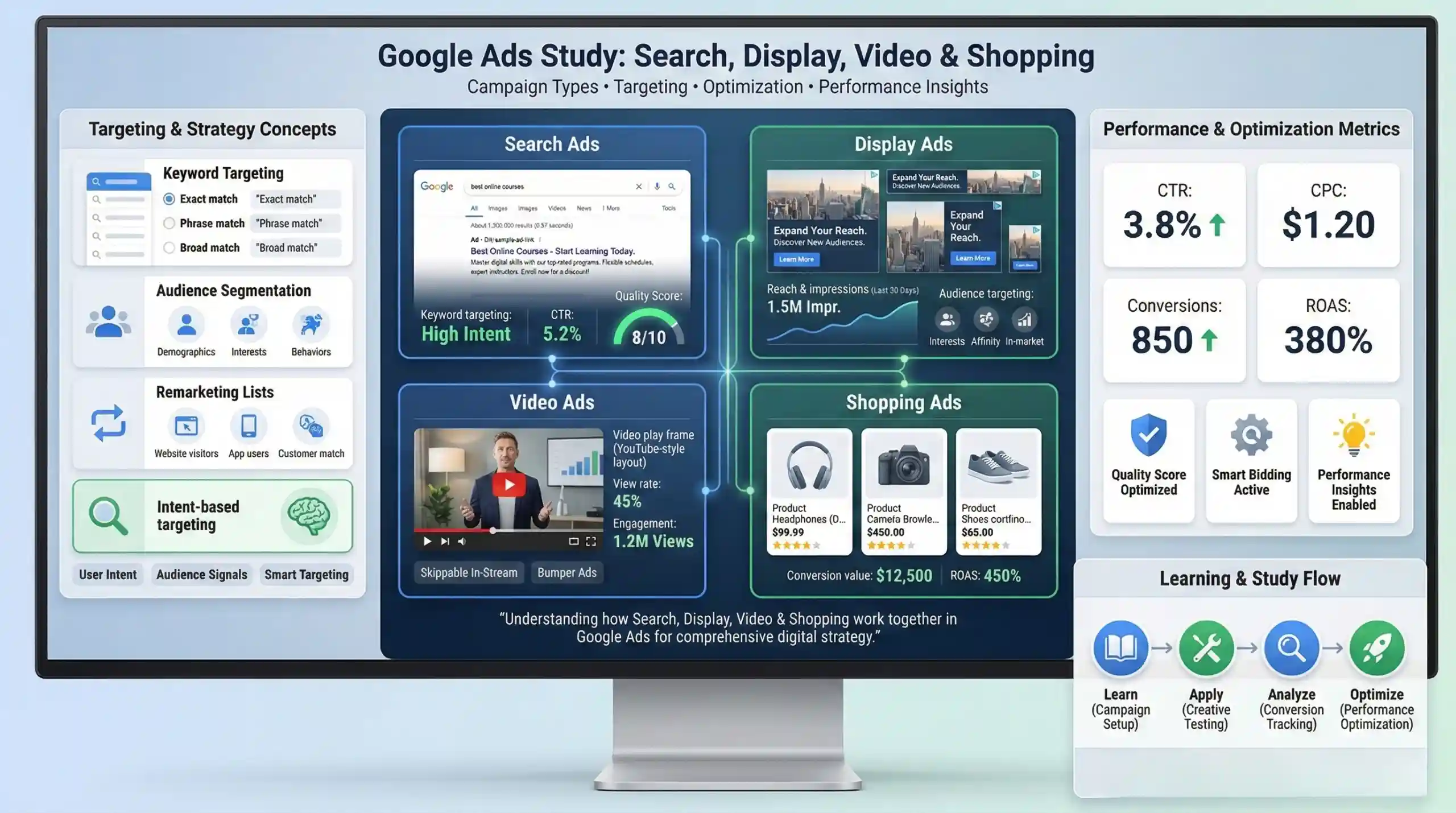
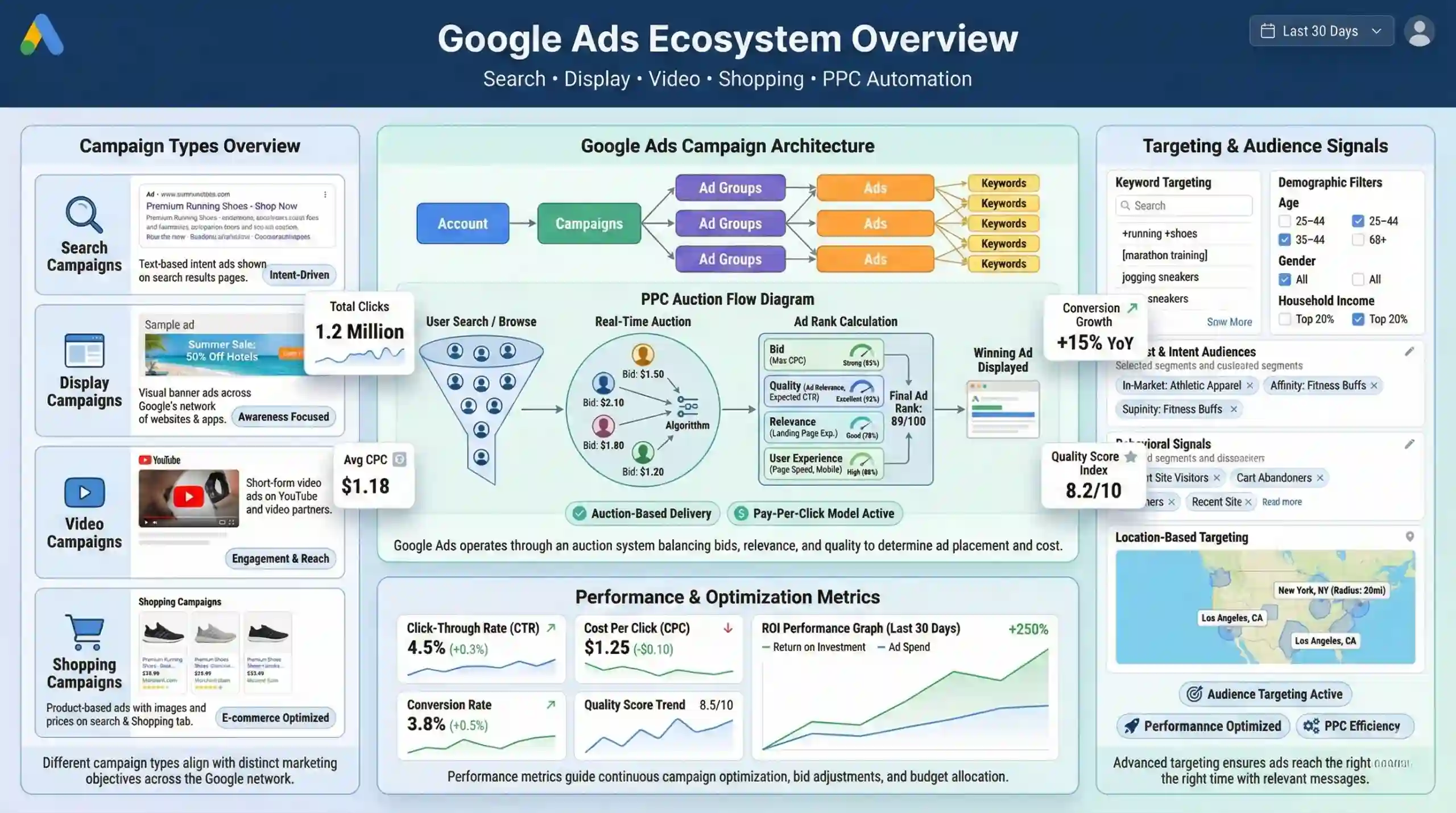
Google Ads is an online advertising platform developed by Google that enables businesses to create targeted advertising campaigns across Google’s vast network, including Search, Display, Video, and Shopping. It functions on a pay-per-click (PPC) model, where advertisers pay only when users interact with their ads. The platform operates through an auction system that determines ad placement based on bid amounts, ad quality, relevance, and user experience.
Google Ads allows precise audience targeting via keywords, demographics, interests, and behavioral data, making it a powerful tool for driving web traffic, generating leads, and increasing revenue. The core components include campaigns, ad groups, ads, and keywords, structured hierarchically to facilitate effective management and optimization.
Familiarization with Google Ads Campaign Types
Google Ads offers various campaign types tailored for specific marketing objectives:
- Search Campaigns: Text-based ads displayed on Google Search results pages, ideal for capturing user intent when users actively seek information or products.
- Display Campaigns: Visually engaging banners shown across websites within the Google Display Network (GDN), suitable for brand awareness and retargeting.
- Video Campaigns: Ads on YouTube and other video partner sites, used for storytelling, engagement, and product demonstrations.
- Shopping Campaigns: Product-based ads that showcase images, prices, and details from online stores, optimized for e-commerce conversions.
Each campaign type requires understanding of different targeting, ad formats, and optimization strategies to achieve desired marketing outcomes.
2. Search Ads Mastery
Keyword Research & Optimization for Google Search Campaigns
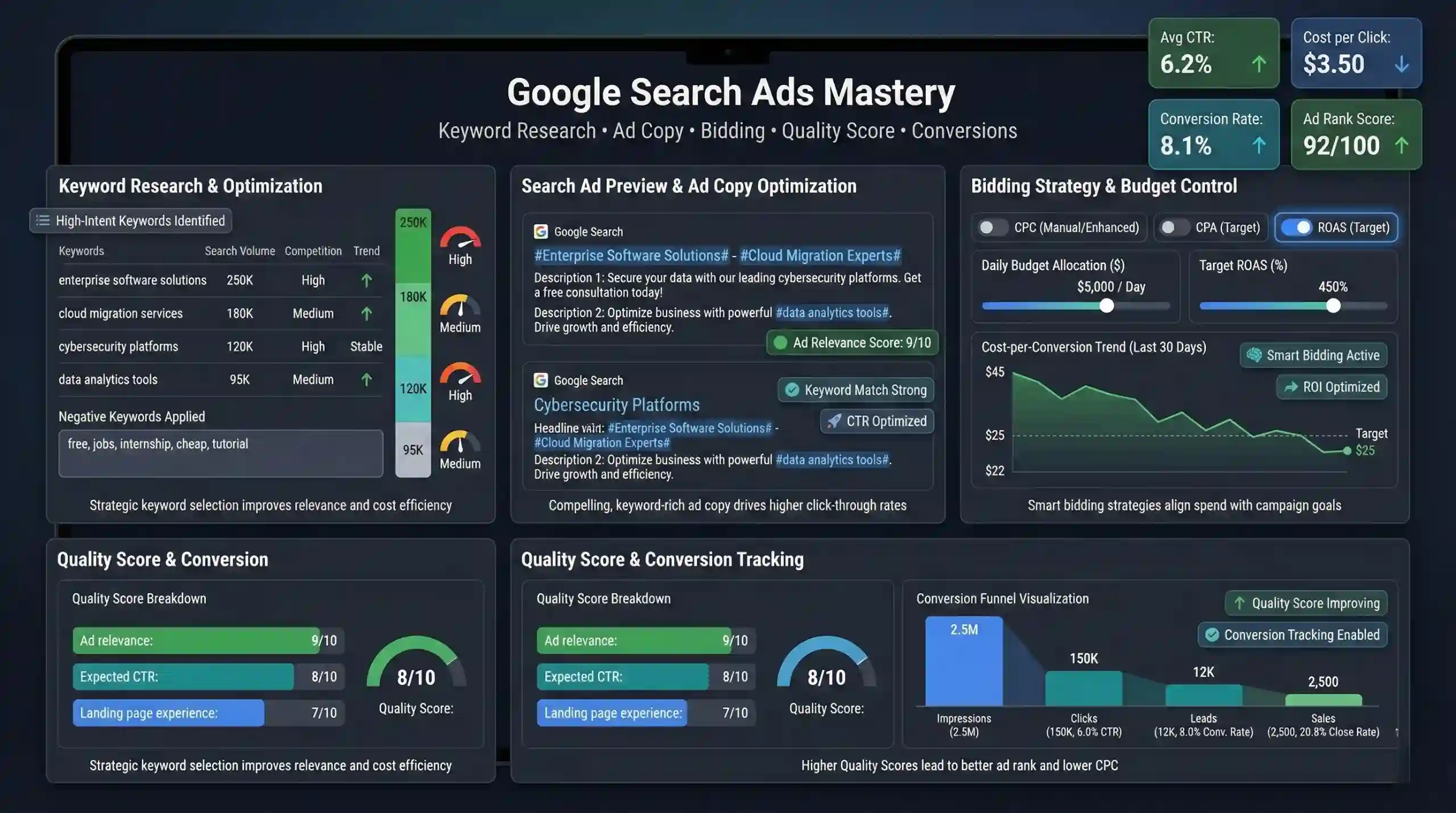
Keywords are the foundation of Google Search Ads; they determine when your ads appear. Effective keyword research involves identifying search terms that prospective customers use. Tools such as Google Keyword Planner, SEMrush, and Ahrefs facilitate discovering relevant high-volume, high-intent keywords. For example, if selling shoes, keywords like “best running shoes” or “affordable sneakers” serve as targeted entry points.
Negative keywords filter out irrelevant traffic by excluding searches unlikely to convert, thus improving ad relevance and Quality Score, which directly influence ad rank and cost efficiency.
Practical Example:
Suppose you sell premium watches. You might add negative keywords like “free” or “cheap” to avoid unqualified traffic, focusing your budget on high-intent searchers.
Ad Copy Writing for Search Ads
Crafting compelling ad copy involves integrating primary keywords naturally into headlines and descriptions to improve ad relevance. Clear, benefit-oriented language with strong call-to-actions (CTAs) like “Buy Now,” “Learn More,” or “Get a Quote” prompt user engagement.
Example of a Search Ad:
Headline: Luxury Watches | Free Delivery & Warranty
Description: Discover our collection of premium watches. Limited-time discount. Shop today for quality and style.
Bidding Strategies & Budget Management
Google Ads offers multiple bidding models:
- CPC (Cost-per-Click): Pay only when users click.
- CPA (Cost-per-Acquisition): Pay per conversion.
- ROAS (Return on Ad Spend): Optimize for revenue generated.
Choosing the appropriate strategy depends on campaign goals. Regular monitoring via Google Ads dashboard—tracking metrics like CTR, conversion rate, and cost per conversion—allows dynamic bid adjustments to maximize ROI.
Quality Score & Ad Rank Optimization
Google assigns a Quality Score based on relevance, click-through rate, and landing page experience. Improving keyword relevance, ad copy alignment, and landing page quality enhances this score, leading to higher ad ranks, better placements, and lower costs per click.
Conversion Tracking & Analytics
Implementing conversion tracking involves adding Google Ads and Google Analytics tags to your website to measure actions like purchases, sign-ups, or downloads. Analyzing keyword and ad performance metrics helps refine targeting and bidding for better campaign outcomes.
3. Display Ads Strategy
Audience Targeting & Segmentation in Google Display Network (GDN)
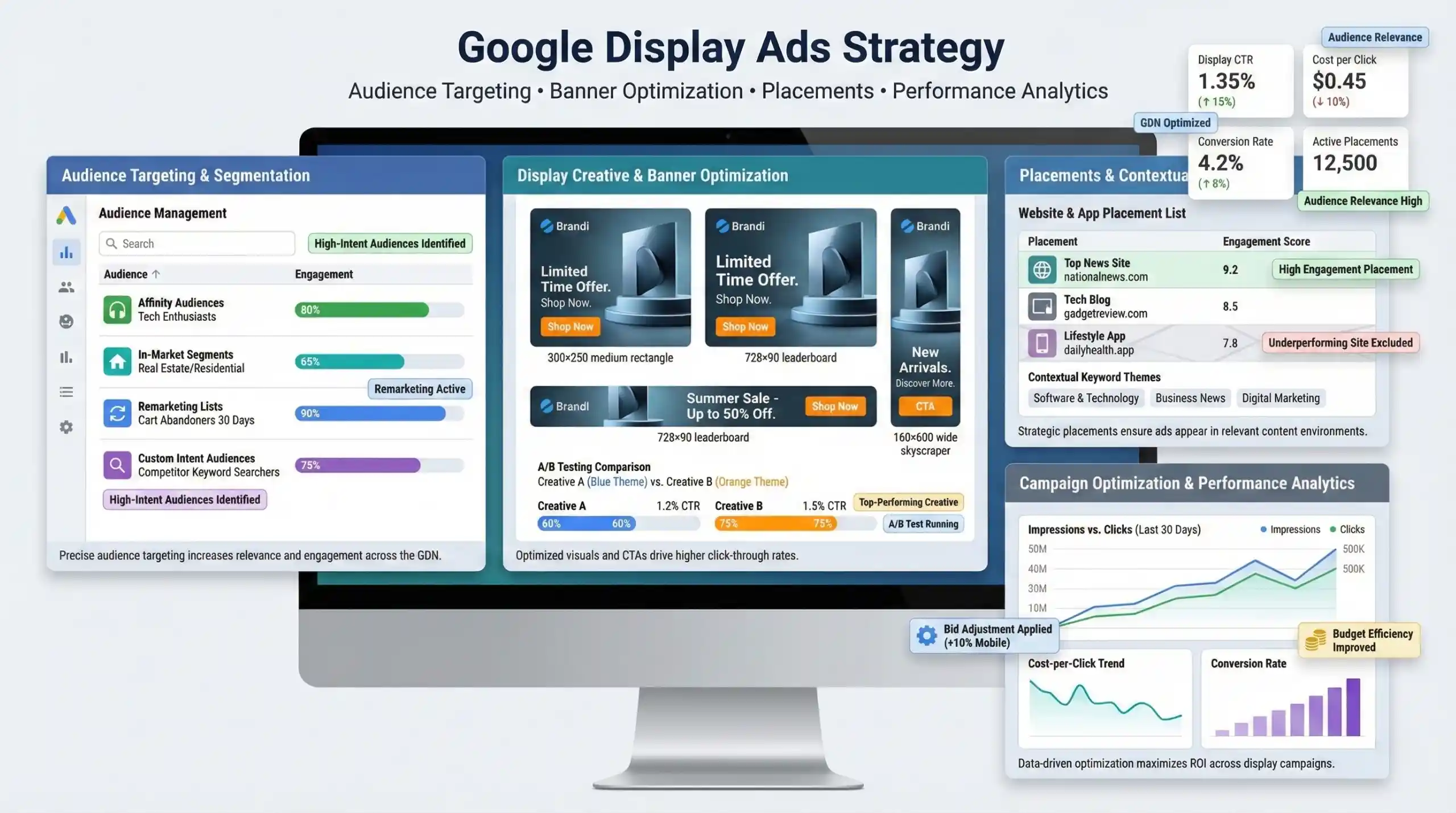
The GDN enables targeting audiences based on interests (affinity audiences), behaviors (in-market segments), and engagement with previous content (remarketing lists). For instance, a fashion retailer can target users interested in fashion accessories or retarget visitors who viewed products but did not purchase.
Creative & Banner Optimization for Display Ads
Effective display banners are visually appealing, constrained within size specifications (e.g., 300×250, 728×90). Consistency in branding, clear messaging, and prominent CTAs improve engagement. Continuous A/B testing of different creatives helps identify top-performing designs for higher click-through and conversion rates.
Placements & Contextual Targeting
Placement targeting involves selecting websites and apps where ads appear. Contextual targeting matches ad content with relevant web content using keyword themes, e.g., showing sports gear ads on sports news sites.
Campaign Optimization in Display Ads
Use GDN insights to adjust bids according to placement performance. Bidding more on high-engagement placements and excluding underperformers optimizes ad spend and boosts campaign efficiency.
4. Video Ads Campaigns
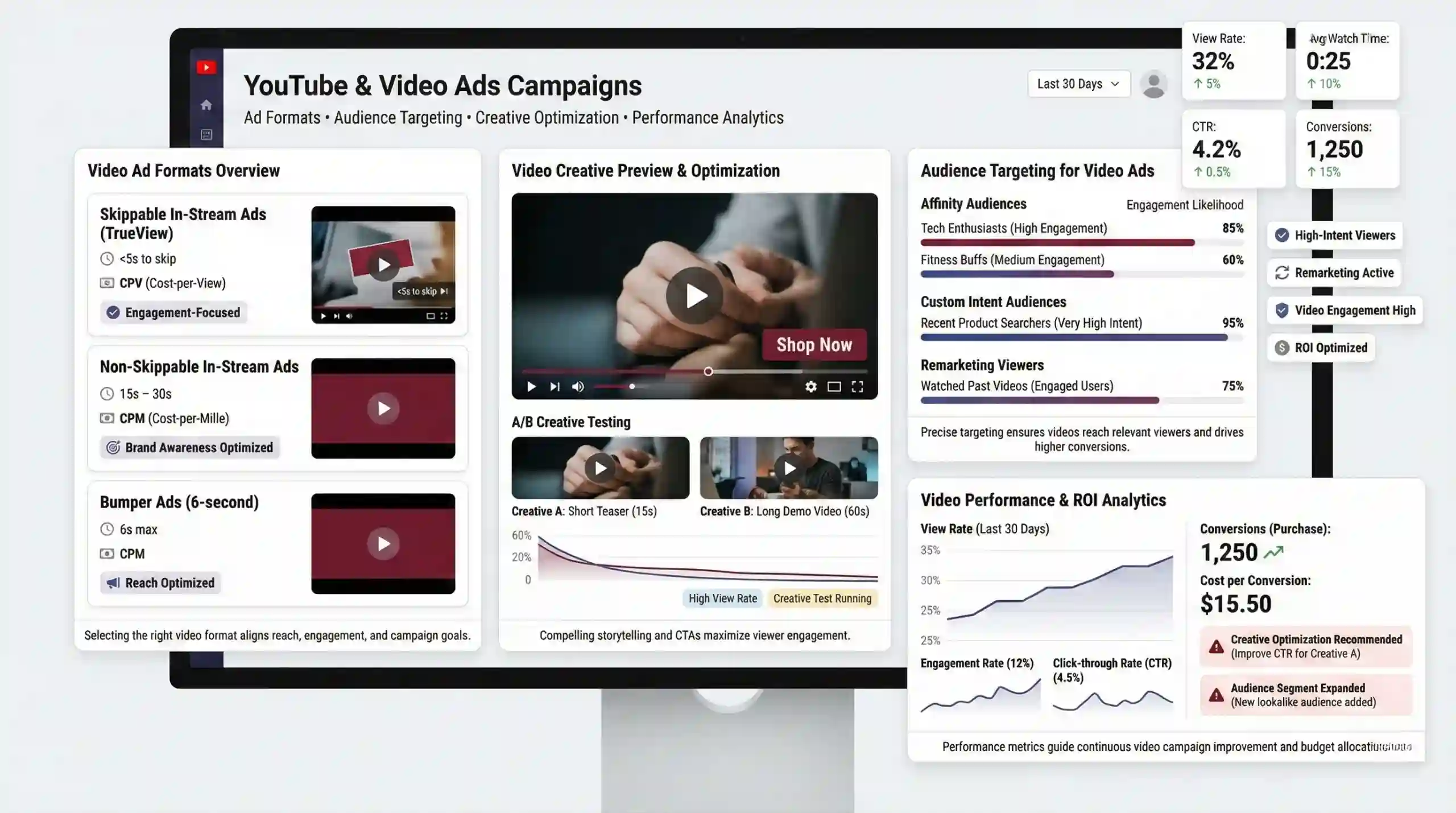
YouTube & Video Ad Formats
YouTube ads include:
- Skippable in-stream ads (TrueView): Viewers can skip after 5 seconds; advertisers pay only for engaged viewers.
- Non-skippable ads: Up to 15-20 seconds, paid regardless of engagement.
- Bumper ads: Short (6 seconds), non-skippable for brand awareness.
The choice depends on marketing goals like engagement or reach.
Audience Targeting for Video Campaigns
Leverage affinity audiences (e.g., “Tech Enthusiasts”), custom intent audiences (users interested in buying specific products), demographics, interests, and remarketing lists to reach highly relevant viewer segments.
Video Creative Optimization
Effective videos tell a compelling story with a clear CTA. Testing various formats—short teasers versus detailed demos—helps determine what resonates with your target audience, optimizing Viewer Engagement and conversion.
Campaign Measurement & Performance Analysis
Key metrics include view rate, engagement rate, click-through rate (CTR), and conversion rate. Regular analysis helps refine creative content and targeting, improving overall ROI.
5. Shopping Campaigns Strategy
Product Feed Optimization for Google Shopping
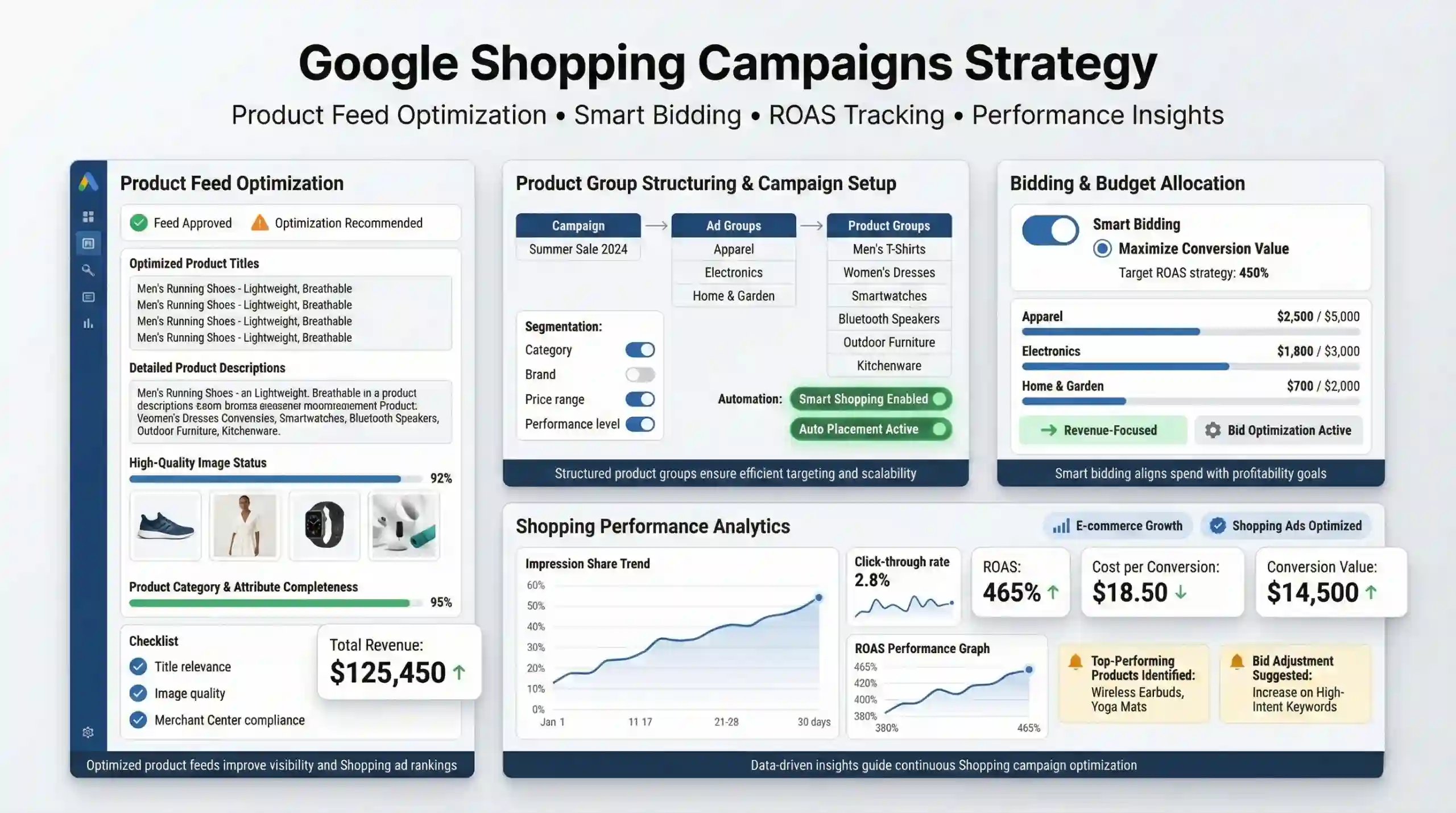
Ensure your product feed adheres to Google Merchant Center policies: accurate product titles, sufficient descriptions, high-quality images, and correct categorization. This enhances product visibility and ranking.
Campaign Setup & Product Group Structuring
Segment products into logical ad groups based on categories, brands, or performance data. Use Smart Shopping campaigns for automated bidding and placement optimization, simplifying management and maximizing efficiency.
Bidding & Budget Allocation for Shopping Ads
Strategies like Maximize Conversion Value focus on revenue generation. Continual monitoring of ROAS and adjusting bids accordingly ensures profitability.
Performance Analysis & Optimization
Track impression share, CTR, conversion rate, and return metrics. Optimize product titles and descriptions, adjust bids according to performance, and refine product groupings to improve overall campaign efficacy.
6. Cross-Channel Integration & Final Tips
Unified Campaign Strategy
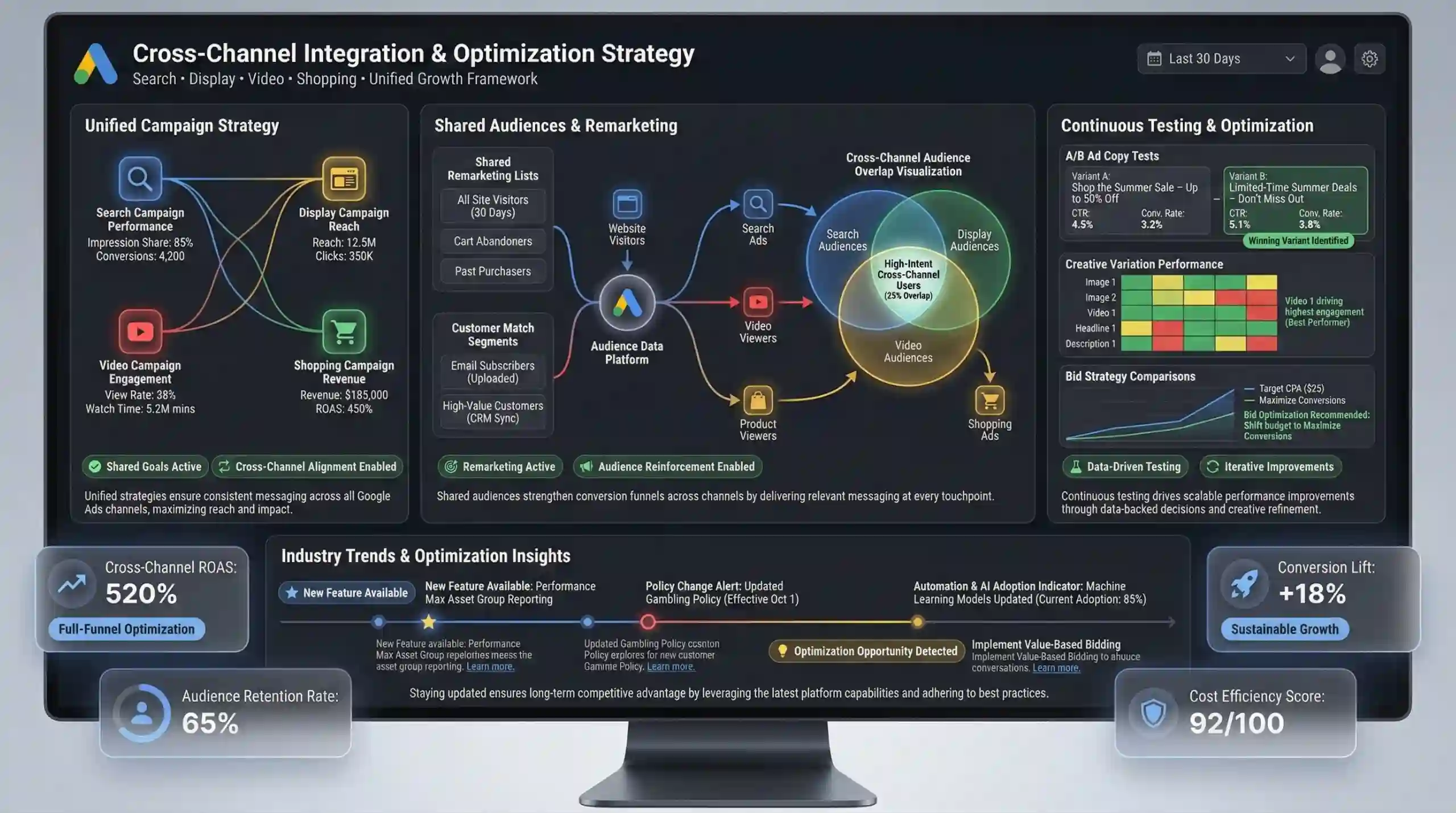
Synchronize Search, Display, Video, and Shopping campaigns around common goals and audience insights. Use shared audience lists and remarketing to reinforce messaging and improve conversion funnels.
Leverage Shared Audiences & Remarketing
Create remarketing lists to target visitors who have interacted with your site across channels, increasing the likelihood of conversions. Customer match allows targeting existing customers with tailored messages.
Continuous Testing & Optimization
Apply A/B testing on ad copies, creatives, landing pages, and bidding strategies to identify the most effective tactics. Use data-driven insights for iterative campaign improvements.
Staying Updated with Industry Trends
Follow official Google Ads updates, industry blogs, and participate in digital marketing forums to stay informed about policy changes, new features, and best practices.
Practice Questions
- Explain how Google Quality Score impacts ad positioning and cost-per-click.
- Describe the role of negative keywords in optimizing Google Search campaigns. Provide an example.
- Differentiate between skippable and non-skippable YouTube ads in terms of format and bidding.
- Outline the key components of a well-optimized product feed for Google Shopping campaigns.
- Describe how remarketing enhances campaign performance across Google Ads channels.
- What are the benefits of using Smart Shopping campaigns over manual shopping campaigns?
- Analyze the importance of ad relevance and landing page experience in improving ad rank.
- Given a scenario where a display ad campaign’s CTR decreases over time, what optimization strategies would you recommend?
- How does audience targeting differ between display and video campaigns in Google Ads?
- Interpret the following data snippet:
Campaign: Search Ads
CTR: 5%
Conversion Rate: 3%
Average CPC: $1.50
ROAS: 400%
Sample Output for Question 10:
Resources for Continued Learning
- Google Ads Help Center
- Google Skillshop – Google Ads Certification
- Google Ads YouTube Channel
- WordStream Google Ads Resources
- W3Schools – Digital Marketing Basics
Beginner-Friendly Websites:
More Courses
- Social Media Marketing course with Gen AI
- Advance Digital Marketing & SEO course with Gen AI
- Advanced Certificate in Digital Design & Marketing course with Gen AI
- Meta & Google Ads course with Gen AI

