

Need to spot the lowest value in your dataset fast? Whether you’re tracking the smallest expense, fastest time, or lowest score, the MIN function in Excel is your quick solution. It instantly returns the smallest number in a range, saving you time from manual scanning.
It’s a simple yet powerful tool that every professional aiming for top business analysis certification should master. Let’s dive in! 👇
💡 What Is the MIN Function in Excel?
The MIN function returns the smallest numerical value from a list, range, or collection of numbers. It’s the direct opposite of MAX().
Use =MIN() when you want to find out:
- Who scored the lowest
- What’s the cheapest price
- Which day had the least sales
- The fastest completion time
📘 Syntax:
=MIN(number1, [number2], ...)- number1, number2… can be:
- A range of cells (like A1:A10)
- Specific values
- Multiple ranges
- A range of cells (like A1:A10)
🔢 Example:
If cells A1 to A5 contain:
CopyEdit
25, 40, 12, 65, 30
Then:
=MIN(A1:A5)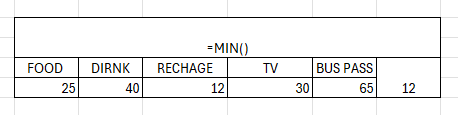
✅ Result: 12
🧪 Real-Life Use Cases for the MIN Function in Excel
Now let’s talk about how the MIN function in Excel fits into the real world:
1. 🎓 Find the Lowest Student Score
You’re evaluating students’ test results:
=MIN(B2:B30)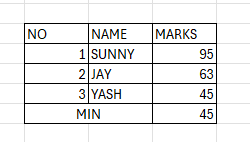
This instantly tells you who scored the lowest — helpful for identifying struggling students or grading adjustments.
2. 🛒 Identify the Cheapest Product
You’re comparing item prices:
=MIN(C2:C100)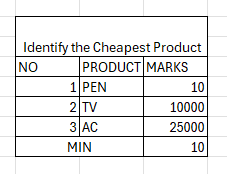
Use this to find the lowest price in a product catalog. Pair it with VLOOKUP to find the matching item name.
3. 📈 Lowest Daily Sales in a Month
For a sales team dashboard:
=MIN(D2:D31)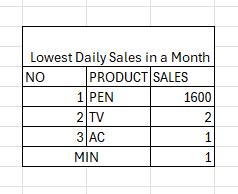
Finds the worst performing day of the month — key for spotting trends or anomalies.
4. ⏱️ Fastest Completion Time
Track delivery or service times:
=MIN(E2:E20)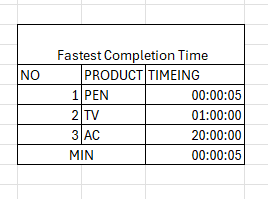
Finds the fastest delivery time in a dataset — useful in logistics and customer support SLAs.
5. 💵 Personal Budget: Lowest Expense
If column F tracks your weekly spending:
=MIN(F2:F10)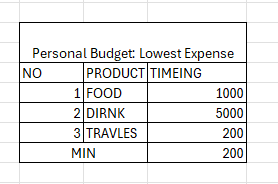
Shows the smallest amount spent, helping identify where you’re most frugal.
🧠 Combine MIN with Other Excel Functions
The real power of MIN() comes when you combine it with logical or lookup functions. Here are some next-level formulas:
✅ MIN + IF = MINIF (Array Formulas)
Excel doesn’t have a native MINIF, but you can simulate it:
🔹 Example: Find the lowest sale from the “East” region
=MIN(IF(A2:A100="East", B2:B100))
✅ Use Ctrl+Shift+Enter if you’re on older Excel versions to make this an array formula.
📍 MIN + IFERROR
Prevent errors in case of empty cells or invalid data:
=IFERROR(MIN(A2:A10), "Check your data")
🔁 MIN + VLOOKUP
Find the item with the lowest price:
=VLOOKUP(MIN(B2:B100), B2:C100, 2, FALSE)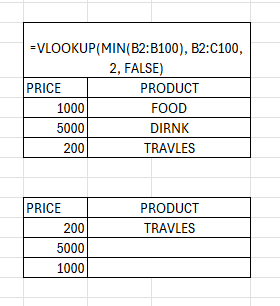
(Assumes price is in column B and name in column C.)
🎨 MIN + Conditional Formatting
Highlight the cell with the lowest value:
Use this formula in conditional formatting:
=A1=MIN($A$1:$A$10)🎯 Visually draws attention to the minimum performer or value.
📊 Use Cases for Dashboards
The MIN function in Excel is a go-to for building KPIs and performance tracking dashboards:
| Metric | Formula Example |
| Lowest Monthly Revenue | =MIN(B2:B13) |
| Fastest Support Response | =MIN(D2:D100) |
| Shortest Lead Conversion Time | =MIN(F2:F50) |
| Lowest Cost Campaign | =MIN(G2:G30) |
You can even combine with chart visuals to add dynamic “lowest” tags or auto-highlight records.
📌 Table Summary: Excel MIN Function Examples
| Formula | Purpose |
| =MIN(A1:A10) | Finds the smallest number in a range |
| =MIN(A1, A3, A5) | Compares specific cells |
| =IF(MIN(B2:B10)<50, “Too Low”, “OK”) | Sets thresholds |
| =IFERROR(MIN(A1:A10), “Invalid”) | Adds error handling |
| {=MIN(IF(A2:A100=”East”, B2:B100))} | Finds min with condition (array) |
⚠️ Common Mistakes Using the MIN Function
❌ Including Text or Errors in Your Range
MIN ignores text and blanks, but errors like #VALUE! can break your formula.
Fix it with:
=IFERROR(MIN(A1:A10), "Error in data")❌ Expecting It to Highlight the Cell Automatically
MIN() returns the value — not the cell. You need to pair it with:
- MATCH()
- INDEX()
- Or conditional formatting for visuals
❌ Assuming MIN Works with Dates Properly (It Does!)
MIN works with Excel dates, because dates are actually numbers under the hood.
So:
=MIN(A2:A20)✅ Returns the earliest date in that range.
💡 Pro Tips for Excel MIN Mastery
✔ Use =MINIFS() in Excel 2019 or Office 365 to filter by multiple conditions
✔ Pair MIN() with INDEX/MATCH to return associated names or IDs
✔ Use in dynamic labels like:
="Lowest Score: " & MIN(B2:B100)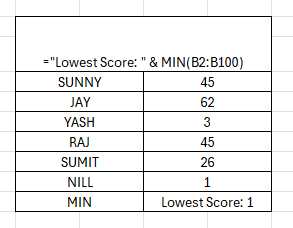
✔ Use with SPARKLINES to highlight minimum performance visually in-line
🔚 Conclusion
The MIN function in Excel is your shortcut to finding the smallest, fastest, cheapest, or earliest value in any data set. It’s perfect for reporting, auditing, performance tracking, and decision-making. From personal budgets to enterprise dashboards, =MIN(range) is the easiest way to extract meaningful insights — and when combined with functions like IF, VLOOKUP, or INDEX/MATCH, it becomes a true analytics powerhouse.
Whether you’re learning advanced Excel for data science, creating an advanced Excel workbook, or practicing data analysis using advanced Excel, mastering MIN helps you work smarter and faster. It’s also a must-know skill if you’re preparing for a top business analysis certification or simply want to level up your professional toolkit.
Summary
🔽 Mastering the MIN Function in Excel
The MIN Function in Excel is one of the simplest yet most powerful tools for spotting the lowest value in a dataset. Whether you’re tracking the smallest expense, fastest delivery time, lowest student score, or cheapest vendor price, =MIN(range) instantly gives you the answer. This function is a must-have for anyone learning advanced Excel for data science, building a smarter advanced Excel workbook, or sharpening their skills in data analysis using advanced Excel.
✨ Why It Matters
- ✅ Quickly identifies the smallest number in any range.
- ✅ Saves time compared to manual scanning.
- ✅ Handles numbers, dates, and times with ease.
- ✅ Works seamlessly with conditional formulas for deeper insights.
When preparing for a top business analysis certification, MIN isn’t just theory — it’s a real-world tool you’ll apply in finance, operations, budgeting, and reporting.
📌 Practical Uses of MIN()
- 🎓 Find the lowest exam score in a class.
- 🛒 Spot the cheapest product in a catalog.
- 📈 Detect the weakest sales day of the month.
- ⏱️ Track the fastest service or delivery time.
- 💵 Highlight the smallest expense in a budget.
Combine MIN Function in Excel with other formulas like IF, INDEX, MATCH, or VLOOKUP, and it transforms into a true powerhouse — letting you not just find the lowest value but also link it back to names, dates, or categories.


Connect With Us
Follow us for updates on our latest courses and events!