

1. Understand Lookalike Audience Fundamentals
What is a Lookalike Audience in Facebook Ads?
A lookalike audience in Facebook advertising is a targeting method used to reach new potential customers who closely resemble your existing high-value audiences. These audiences are generated by Facebook’s algorithm, which analyzes the features (demographics, behaviors, interests) of your source audience and finds users with similar traits within the selected geographic location.
Real-world example:
Suppose an e-commerce store sells organic skincare products. The store has a list of loyal customers who frequently buy. Using this customer list as a source, the store can create a lookalike audience. Facebook then identifies users with similar purchasing behaviors and interests in health and beauty within targeted regions, expanding the reach to likely buyers.
Importance of Lookalike Audiences in Digital Marketing
Lookalike audiences optimize ad targeting by focusing on users who are statistically more likely to convert, thus improving customer acquisition rates and maximizing return on ad spend (ROAS). They facilitate precision segmentation, allowing businesses to scale their campaigns efficiently without broad, untargeted ad spends. Consequently, they are integral to effective digital marketing strategies, especially in Facebook Ads.
2. Prepare Your Core Audience Data
Gather High-Quality Customer Data for Audience Building
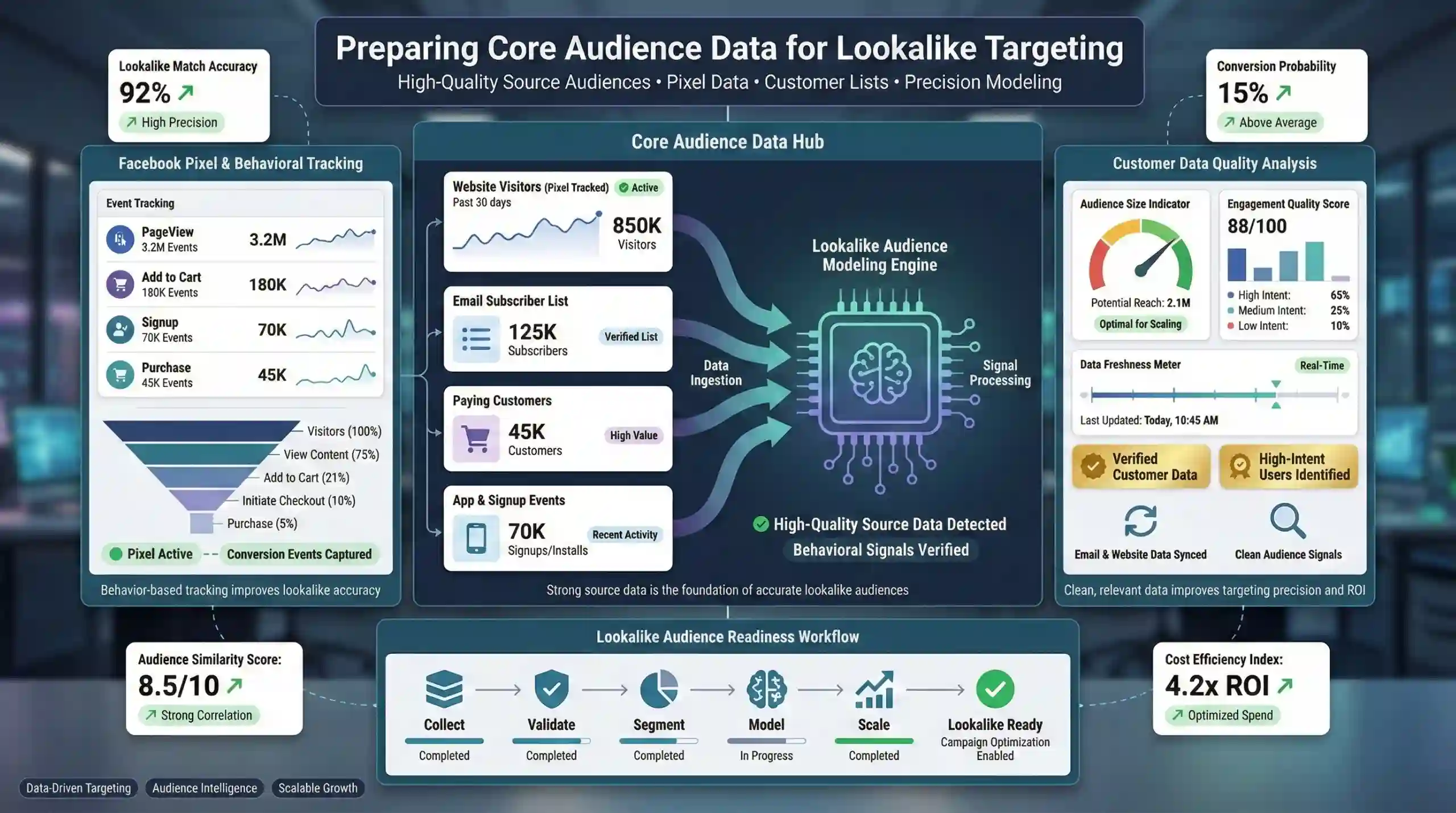
Building effective lookalike audiences begins with sourcing high-quality, relevant customer data. This data can originate from various sources such as Facebook Pixel, email marketing lists, and website traffic analytics. The goal is to create a reliable source audience representative of your ideal customers.
Example:
A SaaS company collects email addresses of paying users and integrates Facebook Pixel data on their website to track user actions such as signups and upgrades. Using this high-quality data, they can craft precise lookalike audiences for targeted campaigns.
Utilize Facebook Pixel for Audience Tracking
The Facebook Pixel is a crucial tool that tracks visitor actions on the website, such as page views, conversions, and other engagement metrics. Proper pixel installation ensures that your source audience reflects actual user behaviors, enhancing the accuracy of lookalike modeling.
Practical note:
Implementing Pixel code on key pages like checkout or registration pages provides richer data, improving the quality of your source audience and, consequently, the performance of your lookalike audiences.
3. Set Up Your Business Manager & Audiences
Access Meta Business Suite for Audience Management
The Meta Business Suite (formerly Facebook Business Manager) provides a centralized interface to manage your ad accounts, audiences, and campaigns efficiently. Familiarity with its audience creation tools is fundamental for successful lookalike audience generation.
Create Custom Audiences from Your Data
Custom Audiences are the foundation of lookalike audiences. They are created by uploading customer data (email, phone numbers) or selecting website visitors tracked via the Facebook Pixel. For example, you can generate a Custom Audience of recent purchasers to ensure your source data for lookalike creation is current.
Ensure Proper Facebook Pixel Integration
Verify that the Facebook Pixel is correctly integrated into your website. A misconfigured pixel leads to incomplete or inaccurate data collection, adversely affecting your lookalike audience quality.
4. Select Appropriate Country & Audience Size
Choose the Right Target Country for Your Campaign
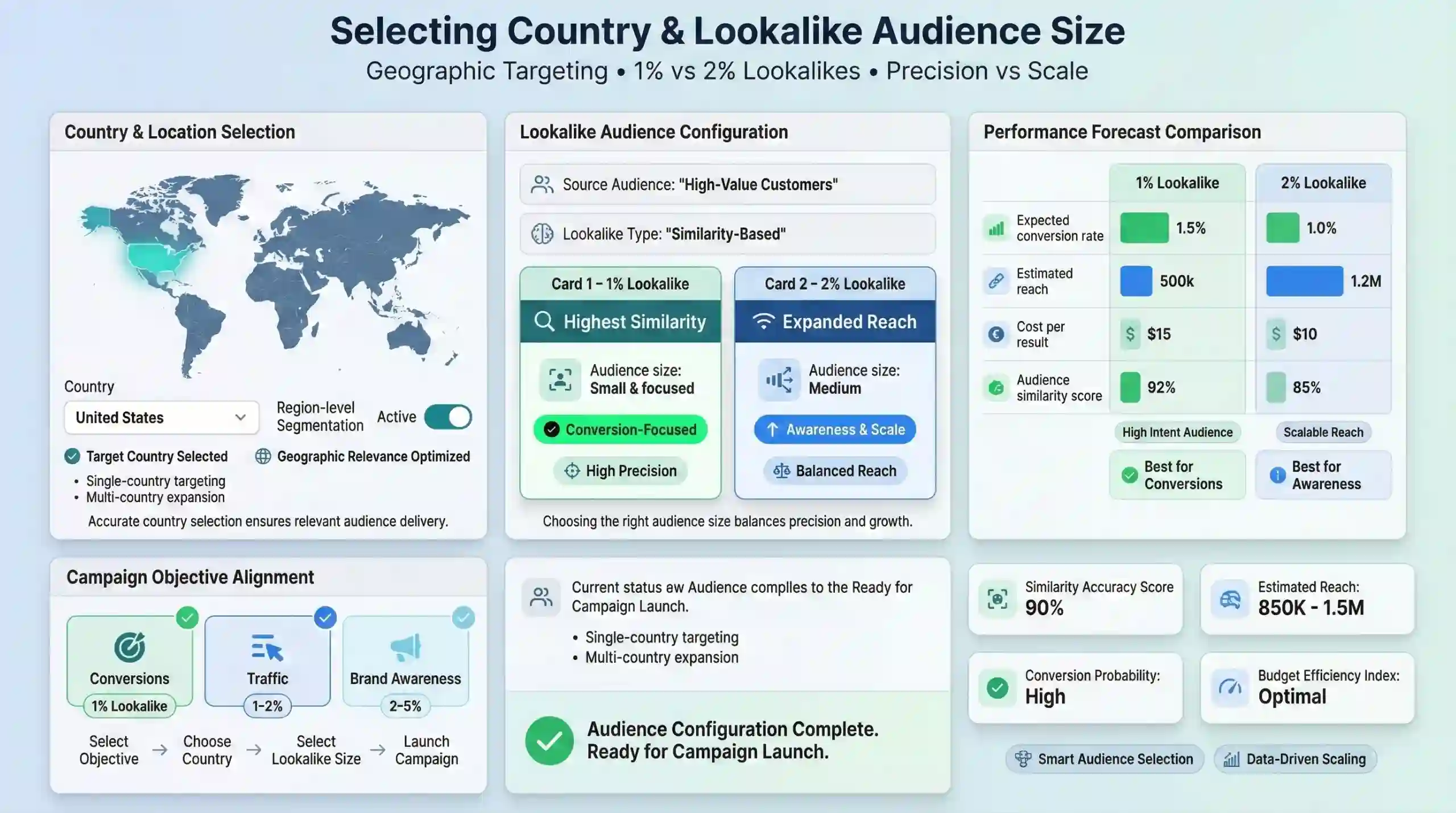
Geographic targeting should align with your business objectives. For example, a local restaurant may focus solely on its city or neighborhood, while an international brand might target multiple countries. Correct location selection ensures relevant audience reach.
Determine Audience Size: 1% vs. 2% Lookalike
- 1% lookalike audience: Consists of the most similar users to your source audience. It provides highly targeted reach, suitable for conversion-focused campaigns.
- 2% lookalike audience: Slightly broader, including users with lesser similarity, expanding reach at the potential expense of precision. Use when seeking brand awareness or larger audience exposure.
Practical example:
A high-converting campaign for a new product might use a 1% lookalike, while a top-of-funnel awareness campaign may opt for 2-5%.
5. Generate the Lookalike Audience
Create a Lookalike Audience in Facebook Ads Manager
In Facebook Ads Manager:
– Select the source Custom Audience (e.g., recent purchasers).
– Choose the target country.
– Set the audience size based on your campaign goal (e.g., 1%, 2%).
This process leverages Facebook’s vast data analytics to identify users matching your source audience.
Specify Geographic Location & Audience Size
Setting the target location ensures geographic relevance. Audience size should correlate with your marketing objective: smaller for high-precision campaigns, larger for broader reach.
6. Integrate Lookalike Audience into Campaigns
Assign the Lookalike Audience in Facebook Ads Manager
During ad set creation, select your lookalike audience as the primary targeting layer. This allows your ads to serve to users who mirror behaviors and demographics of your source.
Refine Demographic & Interest Targets
Further narrowing can involve combining lookalike audiences with interests, behaviors, or demographics for hyper-targeted campaigns. For example, layering interest in organic skincare with a lookalike of skincare buyers enhances ad relevance.
Test & Optimize Creative Elements
Implement A/B testing of ad creatives, headlines, and calls-to-action within your audience segment. Data-driven optimization enhances engagement and conversion rates.

7. Monitor & Optimize Performance
Track Key Facebook Ads Metrics
Regularly analyze metrics such as:
– Click-Through Rate (CTR)
– Conversion Rate
– Cost Per Acquisition (CPA)
– Return on Ad Spend (ROAS)
This data guides strategic adjustments.
Use Insights to Improve Audience Targeting
Refine your source audience and lookalike parameters, and update your ad content based on insights to improve ad relevance and cost efficiency.
8. Scale & Expand Your Facebook Lookalike Campaigns
Gradually Increase Budget & Reach
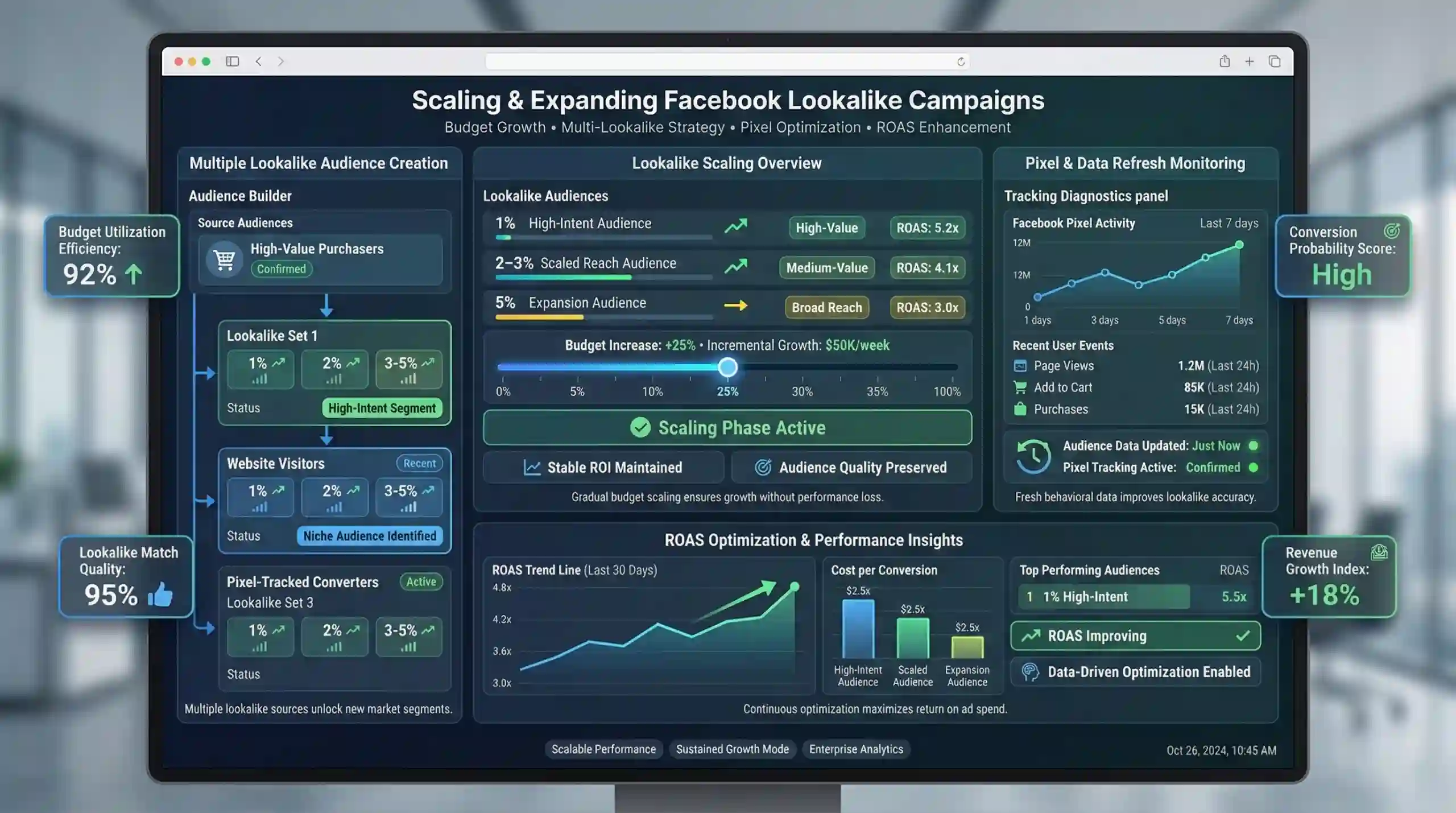
Once campaigns demonstrate positive ROI, incrementally increase budgets. Maintain audience quality to sustain performance.
Create Multiple Lookalike Audiences
Develop several lookalike audiences from different customer segments, such as high-value buyers, website visitors, or interest groups, to target distinct market niches.
Continuously Update Pixel & Audience Data
Regularly refresh source audiences and ensure Facebook Pixel captures ongoing user behavior. This keeps lookalike audiences relevant and enhances campaign effectiveness.
Enhance ROAS through Ongoing Optimization
Utilize performance metrics to fine-tune targeting parameters and creative strategies, driving higher return on ad spend by leveraging advanced data insights.
Practice Questions & Code Output
- Define what a lookalike audience is in the context of Facebook Ads.
- Explain why high-quality source data is essential for creating effective lookalike audiences.
- Describe the process of creating a custom audience from website traffic using Facebook Pixel.
- Illustrate the impact of choosing a 1% versus a 5% lookalike audience in terms of targeting accuracy and reach.
- Construct a simple pseudocode for creating a lookalike audience targeting a specific country with a size parameter.
function createLookalikeAudience(sourceAudience, country, audienceSizePercentage):
    // Initialize Facebook Marketing API client
    apiClient = initializeFacebookAPI()
    // Set parameters
    params = {
        "source": sourceAudience,
        "country": country,
        "percent": audienceSizePercentage
    }
    // Call API to create lookalike audience
    newAudience = apiClient.createLookalikeAudience(params)
    return newAudience
- Identify two key metrics to monitor when optimizing a lookalike audience campaign.
- Discuss strategies for scaling a successful Facebook lookalike advertising campaign.
- Why is it important to regularly update your source audience and pixel tracking data?
- Provide an example of how layered targeting (lookalike + interests) can improve ad performance.
- What are potential drawbacks of using a very broad lookalike audience (e.g., 10%)?
Expected Output
- The lookalike audience will include users similar to your source but with increased diversity, which may reduce targeting precision but increase reach.
- Regular updates to pixel data ensure your audience models are based on the most recent user behaviors.
- Combining lookalike audiences with interest targeting refines the audience further, increasing relevance.
Study Resources & Useful Links
Note: For beginners, it is recommended to start with Facebook’s official tutorials and gradually explore advanced features for effective lookalike audience creation.
By mastering this Loolalike Audience Creation Roadmap, students will develop comprehensive knowledge of strategic audience targeting in Facebook Ads, empowering them to design high-impact digital marketing campaigns with optimized ROI.
More Courses
- Social Media Marketing course with Gen AI
- Advance Digital Marketing & SEO course with Gen AI
- Advanced Certificate in Digital Design & Marketing course with Gen AI
- Meta & Google Ads course with Gen AI

